If Delta Lake Uses Immutable Files, How Do UPDATE, DELETE, and MERGE Work?

Listen and Watch here One of the most common questions data engineers ask is: if Delta Lake stores data in immutable Parquet files, how can it support operations like UPDATE , DELETE , and MERGE ? The answer lies in Delta Lake’s transaction log and its clever file rewrite mechanism. 🔍 Immutable Files in Delta Lake Delta Lake stores data in Parquet files, which are immutable by design. This immutability ensures consistency and prevents accidental corruption. But immutability doesn’t mean data can’t change — it means changes are handled by creating new versions of files rather than editing them in place. ⚡ How UPDATE Works When you run an UPDATE statement, Delta Lake: Identifies the files containing rows that match the update condition. Reads those files and applies the update logic. Writes out new Parquet files with the updated rows. Marks the old files as removed in the transaction log. UPDATE people SET age = age + 1 WHERE country = 'India'; Result: ...

Git & Git Command


Git is the free and open source distributed version control system that's responsible for everything GitHub related that happens locally on your computer 

🚀 Mastering Git Basics 🚀


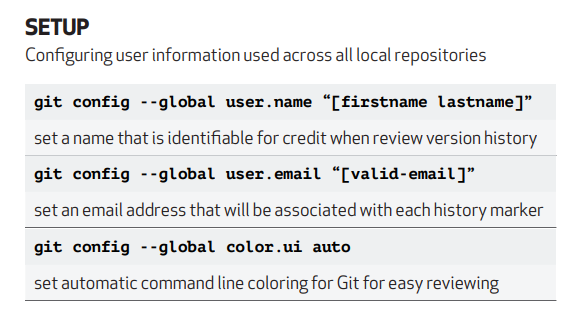
⭐ **ls**: List contents inside the folder
⭐ **mkdir <folder_name>**: Create a project
⭐ **cd <folder_name>**: Navigate into a folder
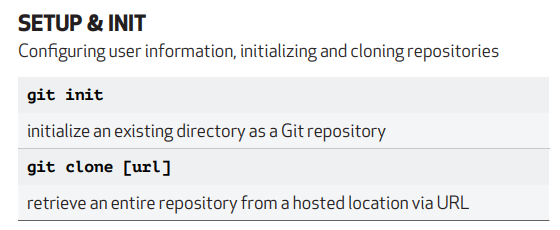
⭐ **git init**: Initialize a Git repository
⭐ **touch names.txt**: Create a new file
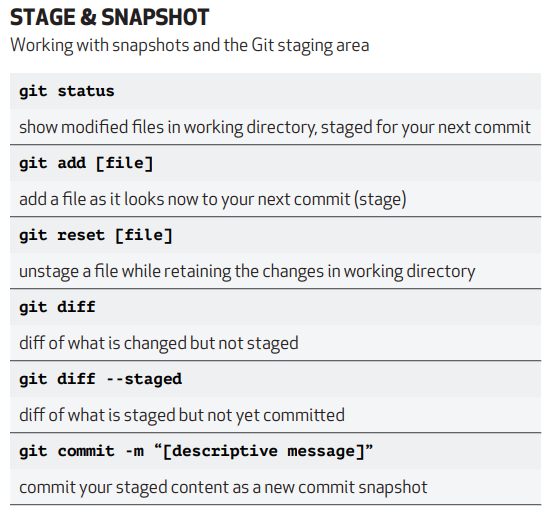
⭐ **git status**: Show directory changes
⭐ **git add .**: Add all untracked files
⭐ **git add file.txt**: Add a specific file
⭐ **git commit -m "message"**: Commit changes with a message
⭐ **vi file.txt**: Edit a file
⭐ **cat names.txt**: Display file content
⭐ **git restore --staged files.txt**: Unstage a file
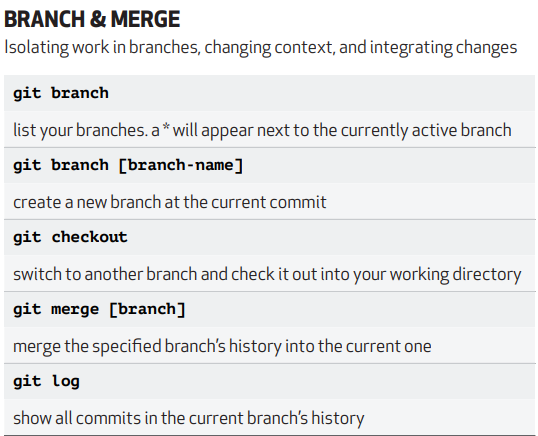
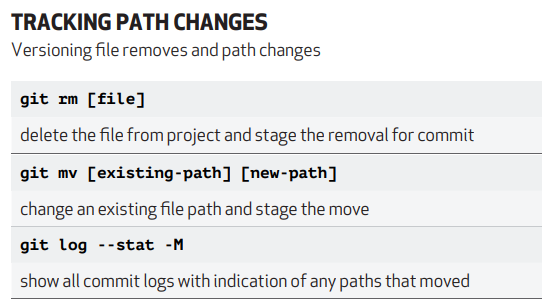
⭐ **git log**: View commit history
⭐ **rm -rf names.txt**: Delete a file
⭐ **git reset <commit id>**: Restore file to a specific commit
⭐ **git stash**: Temporarily store changes
⭐ **git stash pop**: Apply stored changes
⭐ **git stash clear**: Clear stored changes
⭐ **git push**: Push changes to remote
⭐ **git branch feature**: Create a feature branch
⭐ **git checkout feature**: Switch to feature branch
⭐ **git merge feature**: Merge feature branch to main
⭐ **git clone <URL>**: Clone a repository
⭐ **git remote add upstream <URL>**: Add a remote upstream
⭐ **git fetch --all --prune**: Fetch and prune remote branches
⭐ **git pull**: Fetch and merge changes
⭐ **git reset --hard upstream/main**: Reset branch to a remote commit

⭐ **Git Rebase**:
Use `git rebase -i <1st commit id>` to squash multiple commits into one. Use "Pick" to keep a commit or "Squash" to merge it with the previous one. Example:

```
Pick commit id 1
S commit id 2
S commit id 3
S commit id 4
```

Now, all commits are merged into one commit.
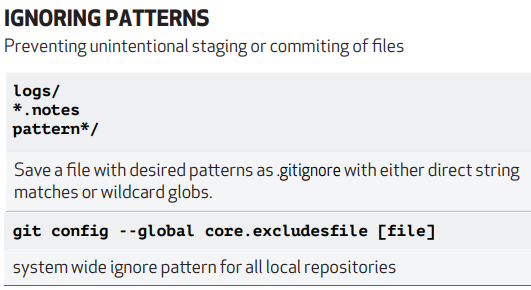
Attaching the cheat sheet for more info.

Comments

  1. good insight about git commnad

    ReplyDelete
  2. Insightful and very helpful.

    ReplyDelete

Post a Comment

Popular posts from this blog

How to Configure a Databricks Cluster to Process 10 TB of Data Efficiently

5 Reasons Your Spark Jobs Are Slow — and How to Fix Them Fast

If Delta Lake Uses Immutable Files, How Do UPDATE, DELETE, and MERGE Work?