Spark Execution Internals: Deconstructing Jobs, Stages, and Shuffles

Understanding Spark Execution: A Deep Dive If you are working with Big Data, writing code that "works" is only half the battle. To truly master Apache Spark, you need to understand how your code is translated into physical execution. Today, let's break down a specific Spark snippet to see how Jobs, Stages, and Tasks are born. The Scenario Imagine we have the following PySpark code: df = spark.read.parquet("sales") result = (     df.filter("amount > 100")     .select("customer_id", "amount")     .repartition(4)     .groupBy("customer_id")     .sum("amount") ) result.write.mode("overwrite").parquet("output") Our Cluster Constraints: Input Data:  12 partitions. Cluster Hardware:  4 executors, each capable of running 2 tasks simultaneously. Q1. How many Spark Jobs will be created? Answer: 1 Job. In Spark, a  Job  is triggered by an  Action . Transformations (like  filter  or  groupBy ) are lazy...

Git & Git Command


Git is the free and open source distributed version control system that's responsible for everything GitHub related that happens locally on your computer 

🚀 Mastering Git Basics 🚀


⭐ **ls**: List contents inside the folder
⭐ **mkdir <folder_name>**: Create a project
⭐ **cd <folder_name>**: Navigate into a folder
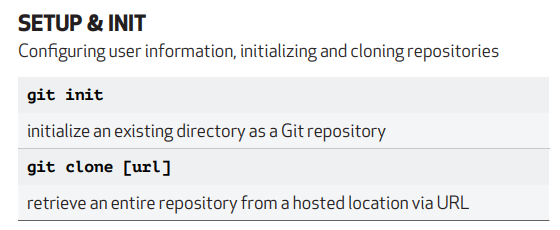
⭐ **git init**: Initialize a Git repository
⭐ **touch names.txt**: Create a new file
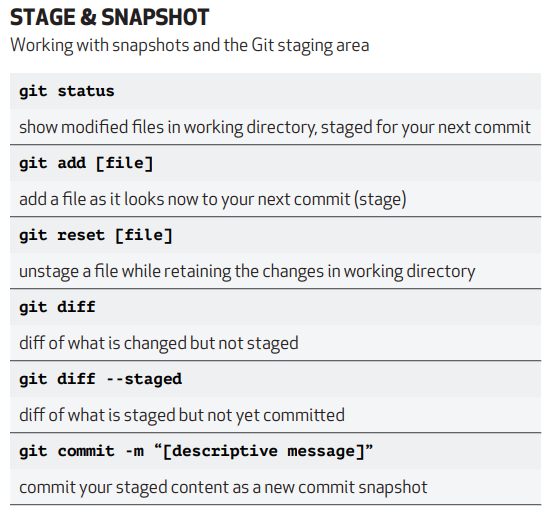
⭐ **git status**: Show directory changes
⭐ **git add .**: Add all untracked files
⭐ **git add file.txt**: Add a specific file
⭐ **git commit -m "message"**: Commit changes with a message
⭐ **vi file.txt**: Edit a file
⭐ **cat names.txt**: Display file content
⭐ **git restore --staged files.txt**: Unstage a file
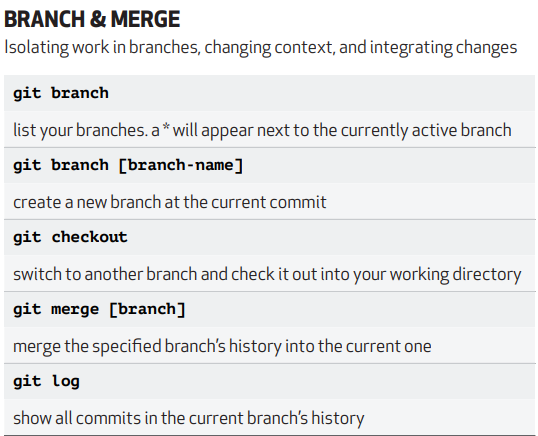
⭐ **git log**: View commit history
⭐ **rm -rf names.txt**: Delete a file
⭐ **git reset <commit id>**: Restore file to a specific commit
⭐ **git stash**: Temporarily store changes
⭐ **git stash pop**: Apply stored changes
⭐ **git stash clear**: Clear stored changes
⭐ **git push**: Push changes to remote
⭐ **git branch feature**: Create a feature branch
⭐ **git checkout feature**: Switch to feature branch
⭐ **git merge feature**: Merge feature branch to main
⭐ **git clone <URL>**: Clone a repository
⭐ **git remote add upstream <URL>**: Add a remote upstream
⭐ **git fetch --all --prune**: Fetch and prune remote branches
⭐ **git pull**: Fetch and merge changes
⭐ **git reset --hard upstream/main**: Reset branch to a remote commit

⭐ **Git Rebase**:
Use `git rebase -i <1st commit id>` to squash multiple commits into one. Use "Pick" to keep a commit or "Squash" to merge it with the previous one. Example:

```
Pick commit id 1
S commit id 2
S commit id 3
S commit id 4
```

Now, all commits are merged into one commit.
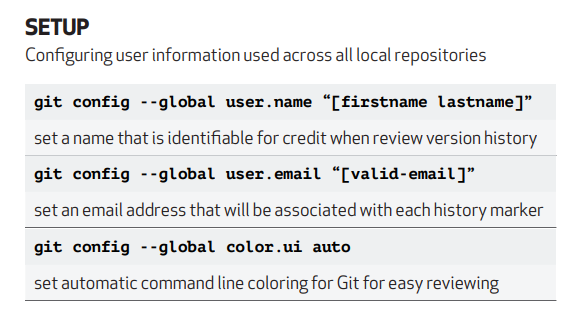
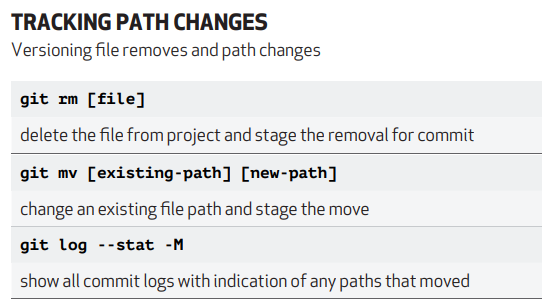
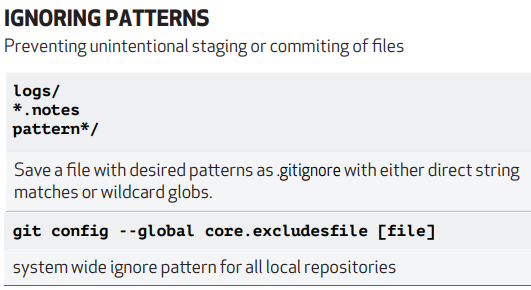
Attaching the cheat sheet for more info.

Comments

Post a Comment

Popular posts from this blog

Spark Execution Internals: Deconstructing Jobs, Stages, and Shuffles

Z-Ordering in Delta Lake: Boosting Query Performance

If Delta Lake Uses Immutable Files, How Do UPDATE, DELETE, and MERGE Work?