Master Jobs, Stages, and Tasks for Data Engineering Interviews

Image
Mastering Spark execution internals is a "must-have" skill for Data Engineers. Whether you are prepping for an interview or debugging a slow production pipeline, understanding how Spark breaks down your code is the key to performance tuning. Spark applications follow a strict hierarchy: Jobs > Stages > Tasks . Let’s break down exactly how this works. 1. High-Level Architecture Before we dive into the code, let’s look at the components that manage the execution: Driver: The brain. It converts your code into a Directed Acyclic Graph (DAG) and schedules tasks. DAG Scheduler: Splits the graph into Stages based on "shuffles." Task Scheduler: Sends the individual Tasks to the executors. Executors: The workers that actually run the tasks in parallel. 2. Real-World Code Walkthrough: The "Wide" Transformation Let’s analyze a common scenario: reading data, filtering, grouping, and saving. # 1. Read Data (Narrow) df = sp...

Git & Git Command


Git is the free and open source distributed version control system that's responsible for everything GitHub related that happens locally on your computer 

🚀 Mastering Git Basics 🚀


⭐ **ls**: List contents inside the folder
⭐ **mkdir <folder_name>**: Create a project
⭐ **cd <folder_name>**: Navigate into a folder
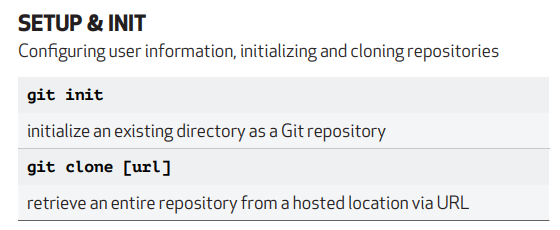
⭐ **git init**: Initialize a Git repository
⭐ **touch names.txt**: Create a new file
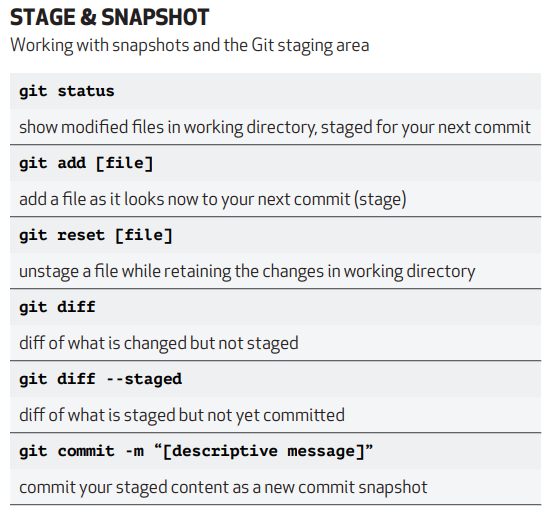
⭐ **git status**: Show directory changes
⭐ **git add .**: Add all untracked files
⭐ **git add file.txt**: Add a specific file
⭐ **git commit -m "message"**: Commit changes with a message
⭐ **vi file.txt**: Edit a file
⭐ **cat names.txt**: Display file content
⭐ **git restore --staged files.txt**: Unstage a file
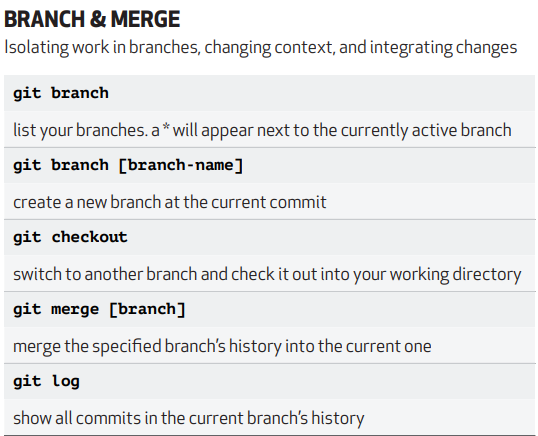
⭐ **git log**: View commit history
⭐ **rm -rf names.txt**: Delete a file
⭐ **git reset <commit id>**: Restore file to a specific commit
⭐ **git stash**: Temporarily store changes
⭐ **git stash pop**: Apply stored changes
⭐ **git stash clear**: Clear stored changes
⭐ **git push**: Push changes to remote
⭐ **git branch feature**: Create a feature branch
⭐ **git checkout feature**: Switch to feature branch
⭐ **git merge feature**: Merge feature branch to main
⭐ **git clone <URL>**: Clone a repository
⭐ **git remote add upstream <URL>**: Add a remote upstream
⭐ **git fetch --all --prune**: Fetch and prune remote branches
⭐ **git pull**: Fetch and merge changes
⭐ **git reset --hard upstream/main**: Reset branch to a remote commit

⭐ **Git Rebase**:
Use `git rebase -i <1st commit id>` to squash multiple commits into one. Use "Pick" to keep a commit or "Squash" to merge it with the previous one. Example:

```
Pick commit id 1
S commit id 2
S commit id 3
S commit id 4
```

Now, all commits are merged into one commit.
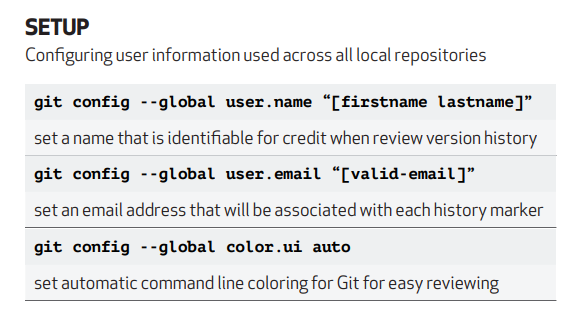
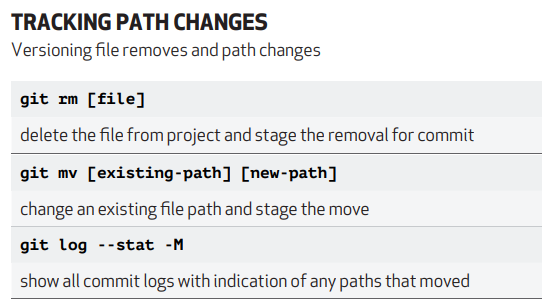
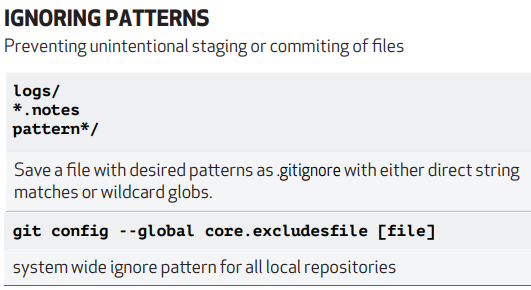
Attaching the cheat sheet for more info.

Comments

Post a Comment

Popular posts from this blog

Master Jobs, Stages, and Tasks for Data Engineering Interviews

How Delta Lake Improves Query Performance with OPTIMIZE and File Compaction

Schema Enforcement and Schema Evolution in Delta Lake